Android Users to Get Control Over Background Blur Effects
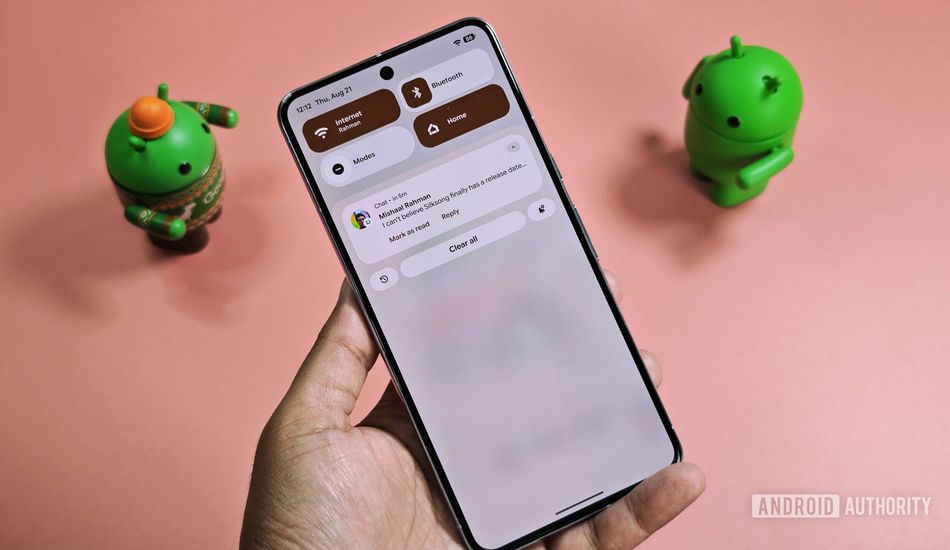
Android's upcoming Material 3 Expressive redesign is set to bring a fresh look to many devices. While the new design language is likely to be welcomed by most, its heavy use of background blur might not be everyone's cup of tea. You'll see this blur effect in various places, such as the Quick Settings panel, notification shade, and even the app drawer. If you're concerned about how this blur might affect readability, there's good news: Google is planning to introduce an option to disable it.
I recall similar concerns when Apple introduced its Liquid Glass design. The key is finding the right balance. Too little blur, and the background remains distracting; too much, and it detracts from the overall aesthetic. While I believe Google has done a reasonable job in this regard, they understand that preferences vary. That's why they're working on a "new customization setting" that'll let you turn off those background blur effects across Android.
According to Mindy Brooks, Google's VP of Product Management and User Experiences on the Android Platform, this option is coming in the "near future." Now, while we don't have a concrete release date just yet, I'm hoping it'll be part of the second quarterly release of Android 16.
It shouldn't be too difficult for Google to implement this feature. A system-wide toggle for disabling background blur already exists within Android's Developer Options. However, turning a developer-centric option into a polished, user-facing feature requires a lot of work. The company needs to rigorously test it, decide where to place it within the UI, create illustrations if necessary, and translate text into multiple languages. Accessibility is also a main point.
Beyond just improving readability and aesthetics, disabling background blur could also offer a slight boost to battery life. Android's battery saver mode already turns off the effect, which highlights its impact. While the power savings might be minor, the blur effect does require GPU processing, so it comes at a cost.
Source: AndroidAuthority