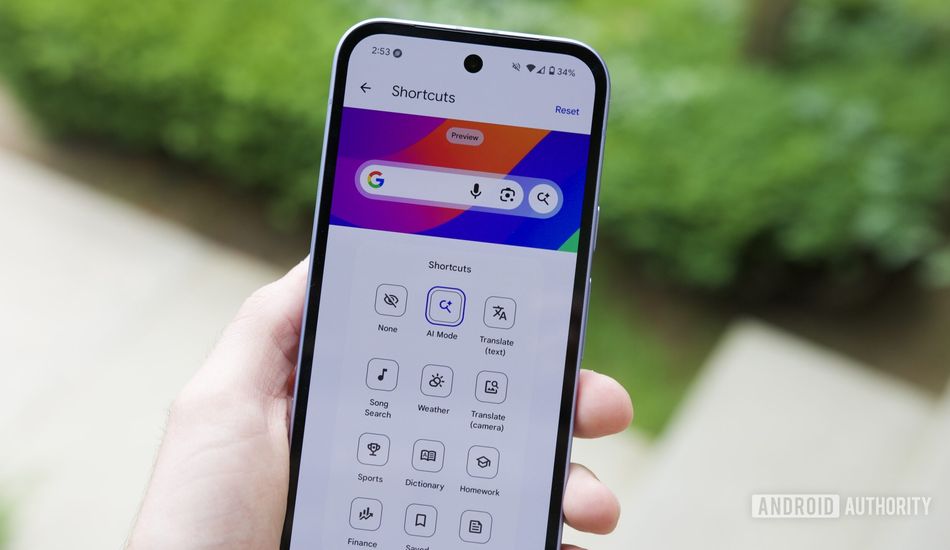
Android 17 Update: Pixel Launcher Search Bar Finally Gets Custom Shortcuts
It seems like Google is always finding new ways for us to search on our Android phones. I mean, think about it: Chrome, the Google app, the app tray, Gemini... the list goes on! And then there are the search options right on your home screen. You've got the Pixel Launcher's search bar and the Google search bar widget.
The Google search bar widget has always been the more adaptable of the two, in my opinion. You can move it around, and you can even change its shortcut. By default, both bars have the same buttons: voice input, Google Lens, and AI Mode. However, the widget allows you to swap out that AI Mode shortcut for something else. And now, it appears that the Pixel Launcher is finally getting that same ability with the new Android 17 Beta 1 release.
I know I've been wanting this kind of flexibility for a while now. Although Android 17 is still some time away from being fully released, it's exciting to know that Pixel users everywhere will soon have this option. Imagine being able to customize that search bar to quickly access your favorite apps or functions!
If you are interested in taking a sneak peek, you can download Android 17 Beta 1 for your Pixel phone and start experimenting with these changes. Just a heads-up: beta releases can be a bit buggy, so be prepared for some glitches. For instance, while you can access the shortcut-changing interface, it doesn't always work perfectly. But hey, it's only Beta 1, and Google has plenty of time to iron out the wrinkles. Let's see what they come up with!
Source: AndroidAuthority